Testing Times Update……
Following on from my recent post, I continued testing my Hasselblad on my desk, and took hundreds of exposures both with the camera’s electronic shutter, and the leaf shutter in the attached lens. Everything seemed to be fine, and there were no crashes recorded when I was shooting with both cards in both SD slots. I swapped the cards round and repeated everything with no problems. It must have sorted itself?
So on Sunday morning, the family walked down to the market at Amble, and I took the camera with the 28mm attached to give it a test. I stopped at one of the art installations on the banks of the Coquet estuary, framed the shot, and clicked the shutter. The bloody camera crashed immediately with the usual message on the back
“Error 10 - cannot access the storage. Please restart the camera”. Bollocks!
When I got back, I decided to continue testing. I didn’t remove or format anything - I just started to click exposures on my desk. I noticed that the green LED on the rear of the camera would occasionally flash for way longer than usual - sometimes 20 seconds, rather than a single second - indicating that it was taking a long time to write the information to one of the cards. When I tried to shoot another image as it was still flashing, it crashed straight away. I started getting somewhere.
I downloaded an app made by Blackmagic (The video camera manufacturer, and creators of Da Vinci Resolve professional video editing software) which measures the read and write speeds of any storage media by writing a 5GB file onto the card, then reading it back. My sandisk Pro cards were advertised as being able to handle 300 Mb/sec in both directions. This was the result of the cards being inserted into the dedicated slot directly in the front of my Mac Studio computer:
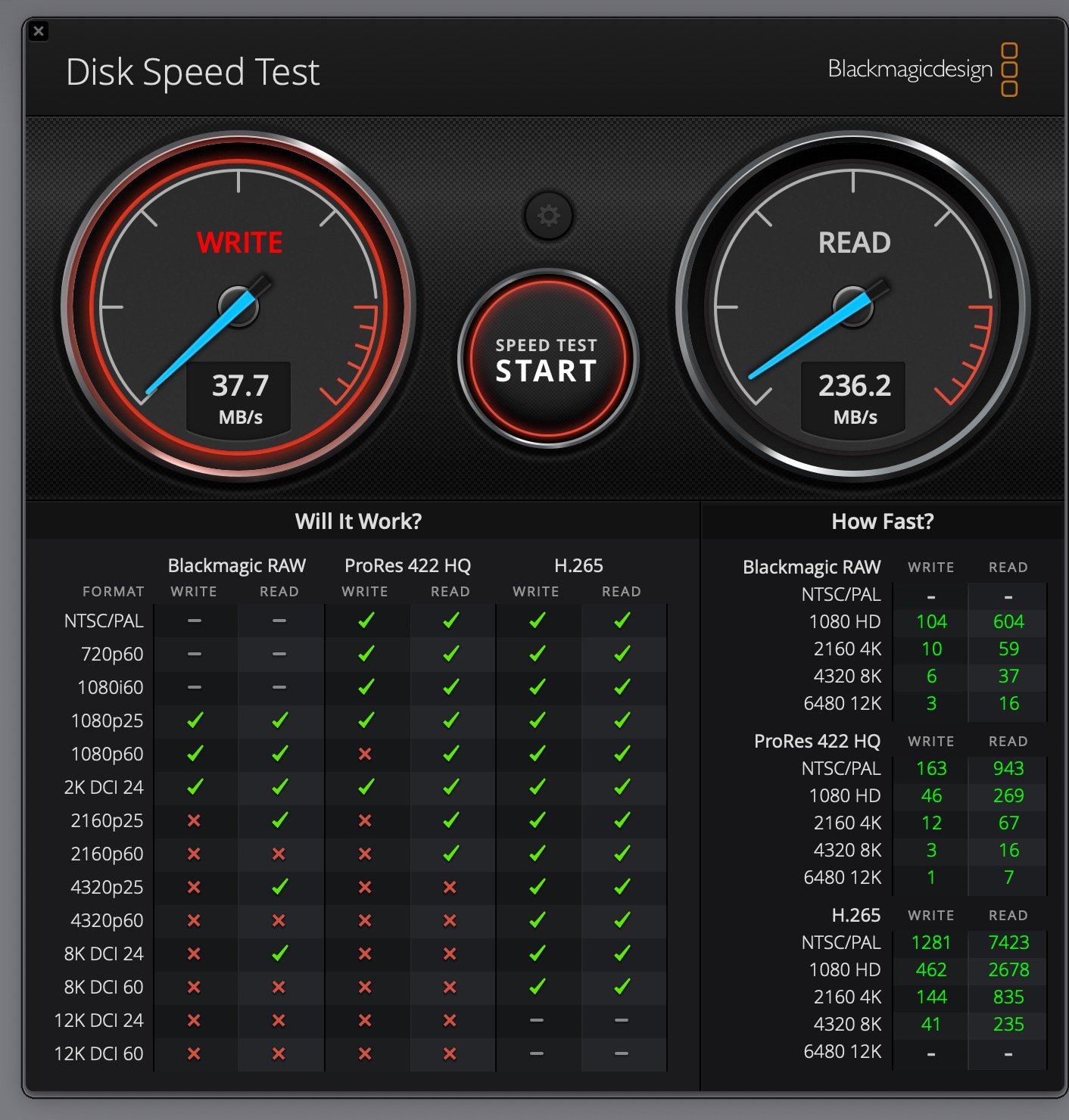
Eureka! The write speed was about 10% of what it should have been. I did the test on both cards a good few times, and got the same results. Curiosity forced me to do the same test on all of my SD and Micro SD cards which I use on a day to day basis in various cameras and devices. It became apparent that a significant proportion of the media storage devices I use are counterfeits……Fakes! Doing a search on how to spot them brought up things such as a lack of serial number printed on the back. The labelling and packaging was indistinguishable from the real thing.
Looking back at my purchase receipts over the years, almost all the cards bought from Amazon UK are not genuine - including the two used specifically in my Hasselblad. The files are over 100 Mb each, and the fake cards simply can’t keep up with the rates of data transfer.
The micro SD cards used in my drone and DJI Osmo Pocket video camera couldn’t be measured properly, as they have to be slotted into an SD card adapter thing, and that saps some of the data transfer speed.Most people who buy these cards don’t use them professionally, so will never realise they’ve paid for sub-standard products. Many of these tiny things are either slow or have reduced capacity, but it’s not going to bother them. If I was shooting sports or press stuff, this could literally destroy your day. That’s why i’ve never used my Hasselblad in the field properly yet.
The cards were bought in September 2025, so I haven’t got a chance of any redress, but I left a damning review of the product and retailer. It won’t allow a zero-star review, but hopefully they got the message. I spent £170 on those two cards, and have been forced to purchase two new cards directly from Sony - the top-tier G series at £100 each. I’ll be testing those in the camera in the coming days. The price of storage media is going through the roof at the moment, and stuff is in short supply as well.
It’s the wild-west on Amazon nowadays. I’d convinced myself that I’d bought these from Wex, the reputable photo supplies retailer, but hadn’t. No more Amazon for anything remotely professional I’m afraid.